Last verified: 2026-11-04. Every free tier, watermark rule and entry price below was re-read on the vendor's official pricing or help page on November 4, 2026, logged out and before tax. The sources are listed at the end.
The best AI video generator in November 2026 depends on the job. SeedVideo AI is the most practical start if you want Seedance 2.5, Kling 4.0, Wan 3.0 and MiniMax H3 in one prompt box. Seedance 2.5 leads for reference-driven clips up to 30 seconds, Kling 4.0 for image-to-video and motion, Google Veo 3.1 for realistic clips with native audio, Runway Gen-4.5 for filmmaking, and Luma Ray3.2 for keyframe direction. Sora is no longer an option.
What changed in the November update
- Sora is gone. OpenAI closed the Sora app on April 26, 2026 and removed the Sora 2 models and the Videos API on September 24, 2026, with no replacement listed. It has moved out of the ranking into its own note below.
- New model versions. Runway now leads with Gen-4.5 and Aleph 2.0, Kling with Kling 4.0 (native 30-second generation and multiple keyframes), and Luma's pricing page lists Ray3.14 next to Ray3.2. Google Flow now offers Gemini Omni Flash alongside Veo 3.1.
- Seedance 2.5 replaces Seedance 2.0 in second place. ByteDance describes it as a joint audio-video model that makes clips up to 30 seconds in one generation, with the option to extend twice.
- Free tiers re-checked. Kling's free Basic plan gets no monthly credits, Runway still gives 125 one-time credits, Pika's free plan has no monthly credits, Luma has no free plan, and Google Flow gives 50 credits a day.
What counts as an AI video generator in this guide
An AI video generator turns a text prompt, an image or an existing clip into new video. Two kinds of product share the name. Model makers (ByteDance Seedance, Kuaishou Kling, Google Veo, Runway, Luma, Adobe Firefly) train their own models and usually sell access through their own app. Multi-model platforms (SeedVideo AI, and partly Runway, Luma, Pika and Firefly) run several makers' models behind one credit balance. A platform's output quality is the quality of the model you pick on it, so this guide ranks both kinds by the job they suit.
Quick picks
| Use case | Best pick | Free tier (checked 2026-11-04) | Watermark on free | Why it fits |
|---|---|---|---|---|
| Best all-in-one, multi-model workflow | SeedVideo AI | 5 free credits per person on entry models (Seedance 2.0 Mini, Seedance 1.5 Pro, SeeDance 1 Pro Fast), up to 720p | None on clips in your account | Seedance 2.5, Kling 4.0, Wan 3.0 and MiniMax H3 in one generator, with the credit cost shown before you generate |
| Best for multimodal reference control | Seedance 2.5 | Depends on the platform; on SeedVideo AI it needs a paid plan or a credit pack | None on SeedVideo AI | Text, image and video references; up to 30 seconds per generation with sound |
| Best for image-to-video and motion | Kling 4.0 | Free Basic plan with no monthly credits; daily free credits are for subscribers | Yes; brand watermark removal starts at Standard | Native 30-second generation, Omni reference, multiple keyframes and Motion Control |
| Best for realism and native audio | Google Veo 3.1 (Google Flow) | 50 Flow credits a day, with or without a subscription; no free generation roughly 2 to 5 PM UTC | Invisible SynthID on every output; visible watermark by toggle, automatic in India, South Korea and Vietnam | Realistic short clips with sound; Flow also offers Gemini Omni Flash |
| Best for filmmaking workflows | Runway Gen-4.5 | 125 one-time credits | "No watermarks" is listed from Standard ($15 a month, or $12 billed yearly) | Gen-4.5, Aleph 2.0 for editing footage, plus Kling 4.0 and Seedance 2.5 as third-party models |
| Best for keyframe direction | Luma Ray3.2 / Ray3.14 | No free plan; Plus is $30 a month ($25 billed yearly) | Not applicable | Up to 16 keyframes, native HDR and EXR export, Modify Video and Reframe |
| Best for viral social effects | Pika | Free plan with no monthly credits (credit packs only) and no commercial license | None on any plan | Effects-first social clips; Starter is $10 a month |
| Best for commercial-safe marketing assets | Adobe Firefly | Free daily generations across image, video and audio, including Luma Ray3.14 | Not stated on the plans page; Content Credentials are attached automatically | Adobe says outputs from its own Firefly models are safe for commercial use |
How we evaluated these AI video generators
This guide is written for creators, marketers, founders and small teams choosing a practical video generation stack. We judged each tool by the questions that matter after the first impressive demo:
- Output quality: Does the video look usable without heavy repair?
- Prompt adherence: Does the model follow camera, subject, motion and style instructions?
- Image-to-video control: Can it animate a reference image without destroying the subject?
- Character and object consistency: Can it keep a person, product or scene coherent across shots?
- Audio support: Can it generate dialogue, ambient sound or effects in the same pass?
- Clip length: How many seconds does one generation give you before you have to edit?
- Iteration cost: What does a second of usable video cost once retries are counted?
- Commercial use fit: Do the free and entry plans allow client or ad work?
- Availability risk: Is the model broadly accessible and likely to stay available? Sora's shutdown is the reason this line is here.
Where this guide says "tested", it means our own recorded runs, not vendor demos: the 30-attempt Seedance 2.5 versus Kling 3.0 character test uses one shared start image, fixed prompts and published scores. Public leaderboards are a cross-check: Seedance 2.5 benchmarks collects third-party scores against Veo, Kling and Runway. Free-tier and watermark rules come from each vendor's official page, not from marketing copy.
Comparison table
Free-tier, watermark and price cells were checked on 2026-11-04 against each vendor's official pricing or help page. Clip length and resolution come from the vendor's model page or, for SeedVideo AI, from its generator.
| Tool | Newest video models (Nov 2026) | Clip length and resolution | Free tier | Watermark on free | Entry paid plan |
|---|---|---|---|---|---|
| SeedVideo AI | Seedance 2.5, 2.0, 2.0 Fast, 2.0 Mini, 1.5 Pro; Kling 4.0, 3.0, O3; Wan 3.0; MiniMax H3 | Seedance 2.5: 4 to 30 s, 480p to 1080p; Kling 4.0: 3 to 30 s, 720p or 1080p; Wan 3.0: 2 to 30 s; MiniMax H3: 5 to 15 s at 2K | 5 free credits per person on entry models, up to 720p | None on clips in your account | Lite $14.90 a month ($13 billed yearly), 100 credits; credit packs from $29.90 |
| Seedance 2.5 (ByteDance) | Seedance 2.5 | Up to 30 s per generation, extendable twice | Depends on the platform | Depends on the platform | Depends on the platform |
| Kling AI | Kling 4.0, Kling 3.0 and 3.0 Omni, Motion Control | Native 30-second generation on Kling 4.0 | Basic plan, no monthly credits | Yes; removal starts at Standard | Standard $6.99 first month, then $8.80 a month, 660 credits |
| Google Flow | Veo 3.1 (Lite, Fast, Quality), Gemini Omni Flash | Veo 3.1 Quality makes 8-second clips | 50 Flow credits a day; Veo 3.1 Lite costs 10, Fast 20, Quality 100 | Invisible SynthID; visible mark by toggle, automatic in three countries | Google AI Pro $19.99 a month, 1,000 Flow credits |
| Runway | Gen-4.5, Aleph 2.0, Gen-4; Kling 4.0 and Seedance 2.5 as third-party models | Gen-4.5 uses 12 credits per second | 125 one-time credits | "No watermarks" listed from Standard | Standard $15 a month ($12 yearly), 625 credits |
| Luma | Ray3.2, Ray3.14 | Ray3.2: 5 or 10 s, 360p to 1080p, HDR | No free plan | Not applicable | Plus $30 a month ($25 yearly), 10,000 credits |
| Pika | Pika effects plus third-party models | Short social clips | No monthly credits, no commercial license | None on any plan | Starter $10 a month ($8 yearly), 900 credits |
| Adobe Firefly | Firefly Video Model; partner models from Runway, Kling and Luma | 5-second video limit below Premium | Free daily generations, limits not stated | Not stated; Content Credentials attached | Standard $9.99 a month, 2,000 credits |
Best for and not for
One line per tool, so you can match the pick to the job before reading the deep dives.
| Tool | Best for | Not for |
|---|---|---|
| SeedVideo AI | Trying Seedance, Kling, Wan and MiniMax in one workspace without switching apps | Teams that need Runway's or Luma's own models, or Google Veo |
| Seedance 2.5 | Reference-heavy shots up to 30 seconds with sound in one generation | Free testing: most platforms keep it behind a paid plan |
| Kling 4.0 | Image-to-video, long single takes, keyframes and Motion Control | Free commercial work: the Basic plan is watermarked and not for commercial use |
| Google Veo 3.1 | Realistic short clips with native audio inside Google Flow | Clips longer than 8 seconds, or generating at peak hours on the free credits |
| Runway Gen-4.5 | Filmmaking pipelines, Aleph 2.0 edits of real footage, a full creative suite | Cheap volume: Standard buys about 52 seconds of Gen-4.5 a month |
| Luma Ray3.2 / Ray3.14 | Keyframe-directed shots, HDR and EXR output, Reframe | Anyone who wants to try before paying: there is no free plan |
| Pika | Social effects, swaps and quick edits with no watermark on any plan | Controlled production pipelines with strict continuity |
| Adobe Firefly | Brand-safe marketing video inside the Adobe ecosystem | Long clips: video below Premium is limited to 5 seconds |
1. SeedVideo AI: best all-in-one AI video generator workflow
SeedVideo AI is the best starting point if your real question is not "which model is best forever?" but "which model is best for this shot?" A prompt that works in Seedance may not be the best choice for Kling or Wan, and SeedVideo AI lets you switch models in the same prompt box and see the credit cost before you press Generate.
What it runs in November 2026:
- ByteDance: Seedance 2.5 (4 to 30 seconds, 480p to 1080p, sound on or off), Seedance 2.0, Seedance 2.0 Fast, Seedance 2.0 Mini, Seedance 1.5 Pro and SeeDance 1 Pro Fast.
- Kuaishou: Kling 4.0 (3 to 30 seconds at 720p or 1080p, with an audio track), Kling 3.0, Kling O3 and Kling 3.0 Motion Control.
- Alibaba and MiniMax: Wan 3.0 (2 to 30 seconds with sound) and MiniMax H3 (5 to 15 seconds at 2K).
- Modes: text to video, image to video, video to video, first and last frame (Seedance 2.5, Kling 3.0, Wan 3.0, MiniMax H3 and other models, at each model's normal image-to-video price), reference to video and Motion Control.
What the free plan really covers, checked 2026-11-04: 5 free credits per person, enough for one 4-second 480p Seedance 2.0 Mini clip, on entry models only (Seedance 2.0 Mini, Seedance 1.5 Pro, SeeDance 1 Pro Fast) at up to 720p. Most desktop and iPhone visitors can spend them before creating an account; that preview carries a watermark until you sign in, and clips in your account have none. Sign-ups on Android currently get no free credits. Paid plans start at $14.90 a month ($13 billed yearly), and one-time credit packs start at $29.90 with no subscription. Commercial use comes with Pro, Premium, any yearly plan or a credit pack.
What a second of video costs on SeedVideo AI, from the AI video price index on November 4, 2026 (Pro plan billed monthly; failed runs are not charged):
| Model and resolution | Dollars per second | A 10-second clip |
|---|---|---|
| Seedance 2.5, 720p | about $0.62 | about $6.20 |
| Seedance 2.0 Fast, 720p | about $0.38 | about $3.80 |
| Kling 4.0, 720p | about $0.68 | about $6.80 |
| Wan 3.0, 720p | about $0.24 | about $2.40 |
| MiniMax H3, 2K | about $0.46 | about $4.60 |
Pro billed yearly is cheaper (Seedance 2.5 at 720p drops to about $0.31 a second), and the price index lists every model, plan and pack.
Choose SeedVideo AI if:
- You want to compare Seedance, Kling, Wan and MiniMax from one place.
- You create both text-to-video and image-to-video content.
- You care about iteration speed and cost per usable clip more than loyalty to one model.
The trade-off is that SeedVideo AI is a workflow layer, not a single foundation model, and it does not run Runway's or Luma's own models. If you are evaluating one model scientifically, still compare outputs model by model.
2. Seedance 2.5: best for multimodal reference control
Seedance 2.5 is ByteDance's newest video model. ByteDance's model page calls it a joint audio-video generation model built for longer storytelling and says it creates videos up to 30 seconds in a single generation, with the option to extend twice. It also lists more precise understanding of reference videos, camera movement and performance blocking, and production controls such as green-screen editing.
That matters because real video work usually starts with references: a product photo, a character sheet, a motion sample or an existing clip that needs a variation. Seedance 2.5 is strongest when:
- The subject has to stay recognizable across a longer take.
- You want to steer the shot with images, a reference video or audio rather than text alone.
- One 20 to 30 second generation is easier than stitching four 8-second clips.
Seedance 2.0 is still a strong, cheaper choice for 4 to 15 second clips, and Seedance 2.0 Fast trades a little quality for lower cost and shorter waits. Review the Seedance 2.5 model page for access and limits, then use reference to video when several images should anchor the shot.
The main watch-out is access: Seedance appears on many platforms, and the version, length and resolution on offer differ by provider. Always check which Seedance model you are running before comparing outputs.
3. Kling 4.0: best for image-to-video creators and motion control
Kling's membership page now leads with Kling 4.0 and describes dynamic motion, Omni reference, native 30-second generation and multiple keyframes. Kling 3.0 and 3.0 Omni remain available for synchronized audio-video generation, storyboarding and element reference, and Kling Motion Control recreates a movement from a reference video on your character.
Kling is a good fit for:
- Image-to-video clips where the subject must survive the motion.
- Character-driven creator videos and product animation.
- Long single takes, now that Kling 4.0 generates up to 30 seconds natively.
- Transferring a real performance onto a character with Motion Control.
Kling's free Basic plan, checked 2026-11-04, has no monthly credits; daily free credits are listed only for subscribers. Brand watermark removal and commercial use start at Standard, which costs $6.99 for the first month and $8.80 a month after that for 660 credits. On SeedVideo AI, Kling 4.0 runs from 3 to 30 seconds at 720p or 1080p and needs a subscription or a Creator credit pack or larger.
The main limitation is prompt discipline. Separate subject motion, camera motion, background motion, lighting and style instead of writing "make this cool".
4. Google Veo 3.1: best for realistic short clips with native audio
Google Veo 3.1 is a strong pick when realism and sound in the same pass matter. In Google Flow it comes in three tiers: Veo 3.1 Lite (10 credits a generation), Fast (20) and Quality (100 credits for an 8-second clip). Flow also offers Gemini Omni Flash for generating and editing video.
Every account, with or without a subscription, gets 50 Flow credits a day, and unused credits do not roll over. That covers a few Lite or Fast clips, not a Quality clip. Google's help page adds that free users may not be able to generate video roughly between 2 and 5 PM UTC. All Flow outputs carry an invisible SynthID watermark; a visible watermark is a toggle in your profile menu and is applied automatically in India, South Korea and Vietnam, except on the Google AI Ultra 20x plan. Paid access starts with Google AI Pro at $19.99 a month, which includes 1,000 Flow credits; our Veo alternatives guide compares those plans with other tools.
Choose Veo 3.1 if:
- You want native audio with realistic footage.
- You care about realism more than stylized effects.
- Short clips (up to 8 seconds per generation) fit your edit.
The limitation is length and peak-hour access on the free credits. Draft on Lite or Fast, then spend Quality credits only on the shot you keep.
5. Runway Gen-4.5: best for filmmaking and consistent worlds
Runway is still the most complete creative suite in this list. Its pricing page lists Gen-4.5, Aleph 2.0 and Gen-4 among Runway's own models, and Kling 4.0, Seedance 2.5 and Seedance 2.0 Pro as third-party models. Gen-4.5 handles generation; Aleph 2.0 is aimed at changing existing footage.
Runway fits:
- Short films, music videos and concept trailers.
- Brand campaigns that need the same character, product or location across shots.
- Teams that want editing, audio and generation in one place, not just a prompt box.
The free plan gives 125 one-time credits. Standard costs $15 a month ($12 billed yearly) for 625 credits and is where "No watermarks" appears in the plan list. Gen-4.5 uses 12 credits per second, so Standard covers about 52 seconds of Gen-4.5 a month. Our Runway alternatives guide compares that cost per second with other platforms.
The watch-out is cost and complexity. Beginners may get faster first results from a simpler image-to-video workflow.
6. Luma Ray3.2 and Ray3.14: best for directed shots and keyframes
Luma is the pick when you want to direct a shot frame by frame. Luma's Ray page describes Ray3.2 with up to 16 keyframes per clip, native 16-bit HDR with EXR export, 5 or 10 second text-to-video and image-to-video at 360p to 1080p, Modify Video for changing existing footage, and Reframe for new aspect ratios.
Luma's pricing page, checked 2026-11-04, also lists Ray3.14, with the same text-to-video, image-to-video and video-to-video credit rates as Ray3.2 plus an Extend Video option (100 credits per 5 seconds at 720p). Ray3.2 costs 100 credits for 5 seconds at 720p and 400 at 1080p; HDR doubles the cost.
Choose Luma if:
- You think in keyframes, changes and transitions.
- You need HDR or EXR output for a grading pipeline.
- You want to extend or reframe existing footage.
There is no free plan: Plus is $30 a month ($25 billed yearly) for 10,000 credits, Pro $90 and Ultra $300. If you only want to try Ray3.14, Adobe Firefly's free plan lists it among its free daily generations. The Luma alternatives guide covers cheaper ways in.
7. Pika: best for viral effects and social video edits
Pika is not trying to be a film production environment. Its strength is fast, playful, effect-driven video for social feeds, from swaps and additions to stylized edits.
Pika fits:
- Effects-first social clips and meme-style ideas.
- Fast image-to-video experiments.
- Creators who want speed more than continuity.
Pika's pricing page, checked 2026-11-04, says no plan has a watermark, including Free. The Free plan has no monthly credits (you buy credit packs) and no commercial license. Starter is $10 a month ($8 billed yearly) for 900 credits, and Creator is $35 for 3,150.
The limitation is control: Pika is not the best choice for complex narrative sequences or strict brand continuity.
8. Adobe Firefly: best for commercial-safe marketing video
Adobe Firefly is the best fit when commercial safety and brand workflow matter more than raw experimentation. Adobe's plans page says outputs from Adobe's own Firefly models are safe for commercial use, because they are trained on licensed and public-domain content, and Content Credentials are attached automatically. For partner models (Runway, Kling and Luma are listed), Adobe leaves it to you to judge whether the output suits the project.
Firefly fits:
- Marketing B-roll, product visuals and social ads.
- Teams already working in Adobe Creative Cloud.
- Projects where legal and client comfort outrank the wildest output.
The free plan gives daily generations across image, video and audio, including Nano Banana and Luma Ray3.14; Adobe does not state the daily limits. Standard costs $9.99 a month for 2,000 credits, Pro $19.99 for 4,000, and Premium $199.99 for 50,000 credits with unlimited Firefly Video Model use. Below Premium, Firefly Video Model clips are limited to 5 seconds.
What happened to Sora 2
Sora 2 ranked ninth in earlier versions of this guide as a quality benchmark. It is no longer available to build on. OpenAI closed the Sora web and app experience on April 26, 2026, and its API deprecation page lists the Videos API and every Sora 2 model (sora-2, sora-2-pro and their snapshots) as removed on September 24, 2026, with no replacement model. SeedVideo AI retired its Sora options on the same date.
If you used Sora for realism and physics, the closest options in this guide are Veo 3.1 for short clips with native audio and Seedance 2.5 or Kling 4.0 for longer takes. The Sora API shutdown migration guide maps Sora settings to current models, and Sora alternatives compares replacements.
Best AI video generator by workflow
If you are a beginner
Start with SeedVideo AI or Pika. SeedVideo AI gives you several model families and free credits to try one, while Pika gives quick effect-driven outputs. If you already have a still image, start with image-to-video, not text-to-video.
If you are making ads
Use Seedance 2.5, Veo 3.1, Firefly or Runway. Seedance is good for reference control, Veo for realistic audiovisual clips, Firefly for brand-safe marketing assets, and Runway for production workflows.
If you are making product videos
Use Seedance 2.5, Kling 4.0, Runway or Firefly. The key is reference consistency: upload the product image, describe the product motion separately from camera motion, and keep the background simple until the subject is stable.
If you are making cinematic scenes
Use Veo 3.1, Runway Gen-4.5, Seedance 2.5 or Luma. Veo is the strongest realism option for short shots, Runway is useful for consistent creative worlds, Seedance is strong when the shot depends on several references, and Luma when you want keyframe control or HDR. For episodic vertical stories, the best AI video generators for short dramas guide compares StoryShort, Seedance 2.5, Kling 3.0, Runway Gen-4.5 and Veo 3.1 on dialogue, continuity and cost.
If you need longer clips
Seedance 2.5, Kling 4.0 and Wan 3.0 all generate up to 30 seconds in one pass, which saves stitching several short clips. The best AI video generators for long videos guide goes deeper.
If you are making social clips
Use Pika, Kling or SeedVideo AI. Social clips reward speed, hooks, motion and repeatable formats. Generate several variations, then polish the strongest one.
More head-to-head guides are collected under AI video model comparisons.
Prompting tips that improve almost every AI video generator
Good AI video output depends on how clearly you describe the shot. A reliable prompt usually separates:
- Subject: Who or what is in the scene?
- Action: What exactly changes during the clip?
- Camera: Is the camera locked, handheld, dollying, panning, orbiting or zooming?
- Scene: Where does the shot happen?
- Lighting: What is the time of day, mood and contrast?
- Style: Realistic, cinematic, anime, 3D, product ad, documentary, fashion or claymation?
- Constraints: What should stay fixed? What should not appear?
Example:
A close-up product shot of a matte black wireless earbud case on a reflective glass table. The case slowly opens as soft blue light glows from inside. Camera pushes in slightly, shallow depth of field, clean studio background, premium tech commercial style. Keep the logo sharp and do not change the product shape.
For image-to-video, make the prompt more specific about motion:
Animate the uploaded product photo. Keep the product shape, color, and logo unchanged. Add a slow clockwise camera orbit, subtle reflection movement on the table, and soft studio light passing from left to right. Background remains minimal and out of focus.
Common mistakes when choosing an AI video generator
Mistake 1: Choosing by demo quality only
Demo videos show the best possible output. Test the tool with your actual use case: your product, your character, your brand style, your aspect ratio and your budget.
Mistake 2: Using one model for every shot
One model may be better for realism, another for image-to-video, another for social effects, and another for brand-safe marketing. Multi-model workflows are normal because the best model changes by shot type.
Mistake 3: Ignoring iteration cost
The first generation is rarely the final one. A cheaper tool that needs 20 attempts may cost more than a stronger model that gets close in 4. Our AI video generator pricing comparison turns each plan into the cost of one 720p, 5-second clip, so you can multiply by your own retry rate.
Mistake 4: Writing vague prompts
AI video models need direction. Replace "make it cinematic" with actual camera, lighting, motion, subject and constraint instructions.
Mistake 5: Building around unstable access
Before building a workflow around any model, check current availability, usage rights, pricing and API status. Sora is the 2026 example: teams that built on its API had to migrate when OpenAI removed it on September 24.
Which AI video generator should you choose?
Choose SeedVideo AI if you want one practical workspace for Seedance, Kling, Wan and MiniMax.
Choose Seedance 2.5 if your shot depends on references, multimodal inputs or a long single take with sound.
Choose Kling 4.0 if you want strong image-to-video, keyframes and motion control.
Choose Veo 3.1 if realism and native audio matter most and short clips are fine.
Choose Runway Gen-4.5 if you are building a film-style project and want a full creative suite.
Choose Luma Ray3.2 or Ray3.14 if you want keyframe-level shot direction or HDR output.
Choose Pika if you want fast social effects with no watermark on any plan.
Choose Adobe Firefly if you need a commercially safe marketing workflow.
FAQ
What is the best AI video generator in 2026?
There is no single best tool for everyone. In November 2026, SeedVideo AI is the most practical starting point for multi-model workflows, Seedance 2.5 is strongest for reference-driven clips up to 30 seconds, Kling 4.0 for image-to-video and motion, Veo 3.1 for realism with native audio, Runway Gen-4.5 for filmmaking, Luma for keyframe direction, and Pika for social effects.
Are any of these AI video generators free?
Several have a free tier, but none is unlimited. As of November 4, 2026: SeedVideo AI gives 5 free credits per person on entry models, Google Flow gives 50 credits a day, Runway gives 125 one-time credits, and Adobe Firefly gives free daily generations. Kling's Basic plan and Pika's Free plan include no monthly credits, and Luma has no free plan.
Which free AI video generator has no watermark?
Pika states that no plan has a watermark, but its free plan has no monthly credits. SeedVideo AI clips in your account carry no watermark on any plan, including the free credits. Google Flow always adds an invisible SynthID mark, Kling removes its watermark only from Standard, and Runway lists "No watermarks" from Standard.
Is Sora 2 still available?
No. OpenAI closed the Sora app on April 26, 2026 and removed the Sora 2 models and the Videos API on September 24, 2026, with no replacement listed. Veo 3.1, Seedance 2.5 and Kling 4.0 are the closest options for the same kind of realistic work.
What is the best AI video generator for text-to-video?
Start with SeedVideo AI if you want to compare models from one interface. For model-specific output, test Seedance 2.5, Kling 4.0, Veo 3.1 and Runway Gen-4.5.
What is the best AI video generator for image-to-video?
Kling 4.0, Seedance 2.5, Veo 3.1, Runway Gen-4.5 and Luma Ray3.2 are all strong image-to-video options. For a simple start, use SeedVideo AI Image to Video and compare Seedance and Kling outputs from the same source image.
Which AI video generator is best for marketing?
Use SeedVideo AI for flexible multi-model testing, Firefly for commercial-safe brand workflows, Veo for realistic audiovisual clips, Seedance 2.5 for reference control, and Runway for production-oriented campaigns.
Sources checked
Free-tier, watermark and price facts were re-read on November 4, 2026 on the pages below. Model access, pricing and API status change quickly, so check the current page before you commit to a paid workflow.
- ByteDance Seed: Seedance 2.5
- Kling AI membership plans
- Google Flow help: credits
- Google Flow help: getting started and watermarks
- Google AI plans
- Runway pricing
- Luma pricing
- Luma Ray3.2
- Pika pricing
- Adobe Firefly plans
- OpenAI API deprecations
- OpenAI: what to know about the Sora discontinuation
- SeedVideo AI pricing and AI video price index
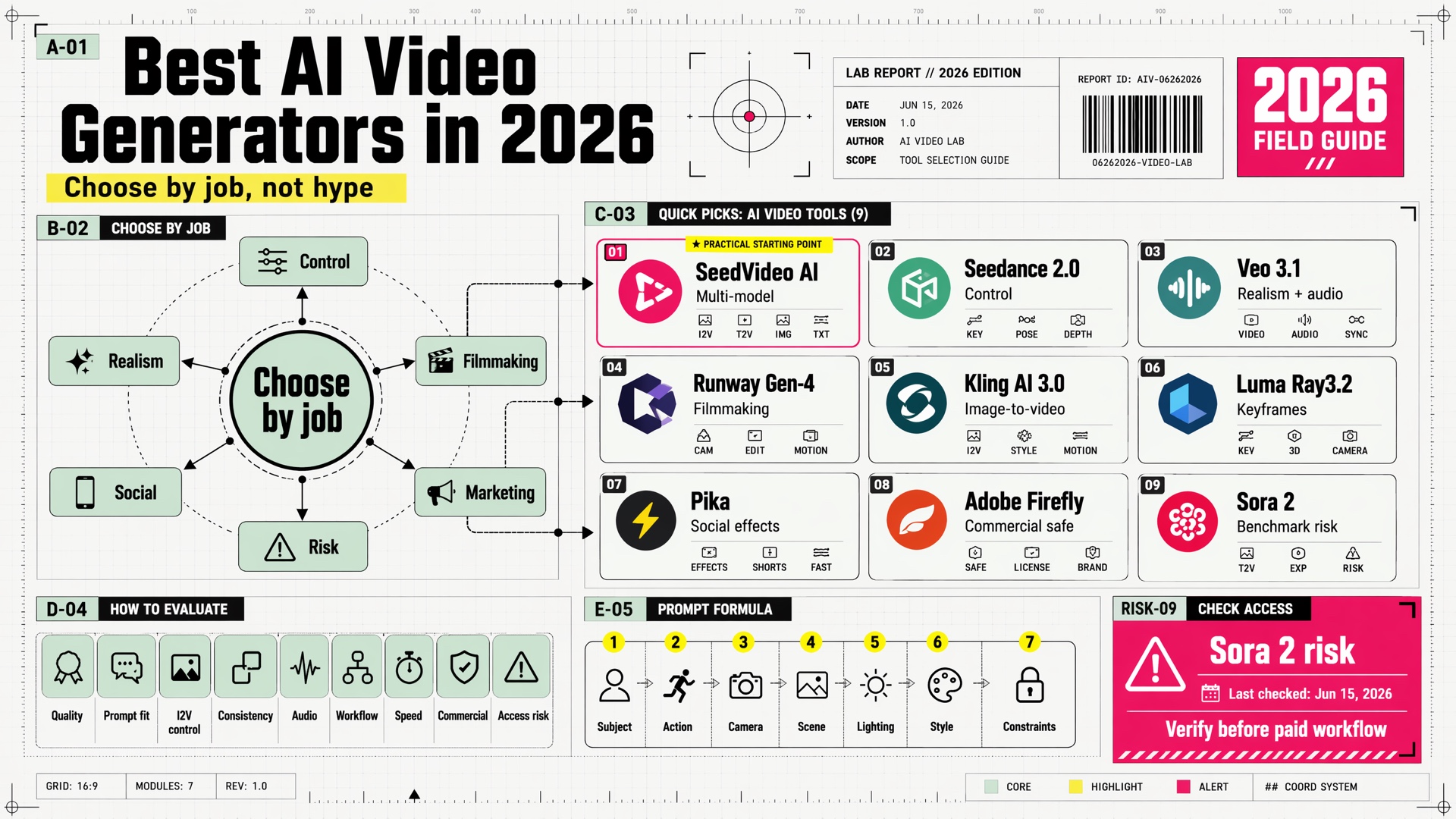
The June 2026 edition of this guide's visual summary. The ranking above replaces it: Seedance 2.5, Kling 4.0, Runway Gen-4.5 and Luma Ray3.14 are newer, and Sora is no longer available.
Related reading: Seedance 2.0 vs Sora 2 vs Kling: 2026 AI Video Generator Comparison